Why I Used to Install All My Agent Skills Globally (and How I Organize My Tools Today)
How I went from 200 global skills cluttering my agent context to a catalog of 17 resident tools, local project installs, and transient clipboard injection.
When working with coding assistants like Cursor, Claude Code, or Antigravity, you quickly discover agent skills. These are directories of instructions and scripts that teach an agent how to handle specific tasks: track down an elusive bug, refine UI styling, resolve Git merge conflicts, or analyze performance.
As I explored GitHub repositories, I kept installing promising skills. Before long, I had over 200 skills sitting on my machine.
I didn't collect them just for the sake of accumulating files, but out of sheer convenience. To see how I ended up overwhelmed, we need to look at how we manage our everyday tools.
The convenience of "everything global" (like pip install without venv)
In Python, many developers know this reflex: early on, to move fast and avoid creating a virtual environment (venv) for every small script, you install packages directly into your global Python environment. Everything is immediately available everywhere without a second thought.
With agent skills, I did the exact same thing.
Installing a skill into a specific project using a command like npx skills add is fast. The real hurdle isn't running the command; it's memory:
- To install a skill locally in a new project, you first have to remember its exact name.
- With dozens of skills in mind, you forget whether a tool was called
anti-ui-slop,ui-review, orstop-slop. - You waste time digging through old project folders to find where you last used it and copy the command.
To save myself that mental overhead, I dumped everything into global storage. That way, no matter where I opened my editor or terminal, all my skills were right there, ready to go.
Except in the LLM world, "global" doesn't behave like a standard code library at all.
What "everything global" actually costs
A Python package installed globally sleeps quietly on your disk. It consumes zero resources until you import it in a script.
For an AI assistant, it's the complete opposite.
For the model to know which tools are available and decide when to call them, the client app constantly injects the name and description of every single active skill into its system prompt on every exchange.
With 200 skills configured globally, that meant thousands of tokens sent with every request before I even typed the first word of my prompt.
I didn't notice right away. The first warning signs came from the agent interfaces themselves: warnings in configuration screens noted that the skill list was getting too heavy and consuming too much context window.
While the agent didn't crash, the impact was clear: useful context was being eaten away unnecessarily, and faced with an avalanche of overlapping descriptions, the model hesitated or overlooked relevant tools altogether.
Why simply deleting wasn't enough: the need for a catalog
My first instinct was to purge everything. But deleting them wholesale brought another issue: among those 200 skills, many were genuinely great tools. For instance, I had discovered jupyter-notebook for cleanly manipulating and generating Python notebooks, or improve-codebase-architecture for analyzing codebase architecture and suggesting structural improvements.
These are high-value skills, but they don't belong in my daily system prompt when doing ordinary coding tasks.
If I simply wiped them from my machine, I would lose track of those tools and their exact names. What I actually needed was:
- Everyday core skills: a tight set of essential tools for my regular sessions.
- A skills catalog: an isolated place on my drive to keep, document, and search specialized skills without any agent loading them into memory. I would install them locally in projects.
Also, since I switch between different coding agents (Antigravity, Cursor, and Kilo Code) whose skills directories may differ, automated synchronization across them was essential.
The missing piece: transient use via the clipboard
Looking at my workflow, I realized something simple: most specialized skills don't even need to be installed in a project.
If I want to run a one-off architecture audit using improve-codebase-architecture or handle a Jupyter notebook for an afternoon, it's a temporary action. Why install that skill into my project (adding extra files to the Git repo) or add it globally (bloating every prompt for nothing)?
To automate this transient injection without relying on heavy tooling, I wrote a small local CLI script. With the manage-skills use <skill-name> command, the script fetches the complete skill instructions from my local catalog (~/.agents/catalog/) and copies them straight to my Windows clipboard. All I have to do is hit Ctrl + V in the active agent conversation. Currently, the command only works for single-file skills.

The agent reads the instructions for that specific task and does the job without being added to the system prompt (local or global).
My current workflow: from global to local, down to the clipboard
Today, my tooling revolves around a skills catalog:
Library / Catalog
~/.agents/catalog/
Passive disk storage — 0 tokens consumed by assistants
Everyday skills
~/.agents/skills/
Local project
npx skills add
Clipboard
manage-skills use
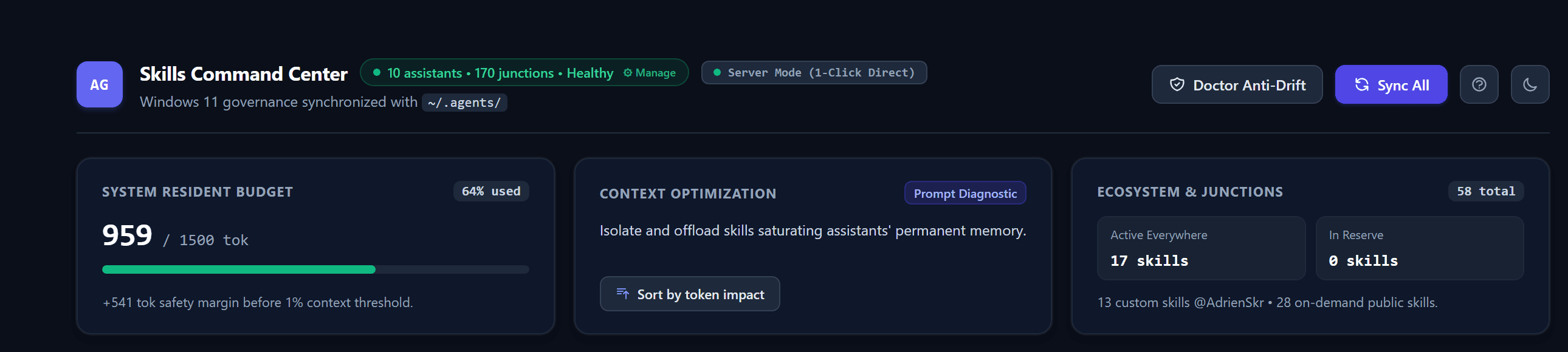
- Everyday skills (global install, 17 active): Essential cross-cutting tools (
code-review,diagnosing-bugs...), grouped in~/.agents/skills/and shared across my 10 assistants via NTFS junctions (mklink /J), under a 1,500-token ceiling. - Local project (local install, targeted folder): Specialized skills for a specific stack (
jupyter-notebook), installed directly in the project folder vianpx skills add. - Clipboard (one-off use,
Ctrl + V): Isolated audit or analysis tools (improve-codebase-architecture), injected on the fly with themanage-skills usecommand without cluttering the prompt or leaving traces on disk. - Skills catalog (
~/.agents/catalog/): The directory on disk where all other skills discovered through research and tech watch are stored, without being loaded into assistant memory.
What actually changed in practice
The most significant takeaway wasn't just clearing configuration warnings.
It was how my assistants behaved: with 17 well-targeted skills instead of 200, the agents started using their tools spontaneously.
When the system prompt was flooded with dozens of tool descriptions, the model struggled to pick the right one, often forcing me to explicitly name the skill to invoke. With a concise, unambiguous catalog, the agent immediately knows when to pull out diagnosing-bugs or code-review without prompting.
Installing everything globally is a tempting habit to dodge memory friction. But once you measure the actual impact of tool descriptions on an LLM's context, organizing them changes everything: keep a handful of daily essentials global, install specialized skills only in projects that genuinely need them, and rely on the clipboard for one-off needs.